No Code 101: How Visual Building Works 2026
No-code is a method of building software, websites, and apps through visual, drag-and-drop interfaces that require zero traditional programming. It lets non-technical people, often called citizen developers, ship working tools without hiring engineers. Most 2026 estimates place the combined no-code and low-code market between $30 billion and $50 billion, depending on methodology.
Table of Contents:
- Key Takeaways
- Introduction
- What Is No-Code, Really?
- How Did No-Code Evolve From Excel to AI?
- What's the Difference Between No-Code and Low-Code?
- Why Is No-Code Growing So Fast?
- What Can You Actually Build Without Writing Code?
- What's the Easiest Way to Build a No-Code Website?
- How Much Does No-Code Really Cost?
- Is No-Code Actually Secure?
- FAQ
Key Takeaways
- Every no-code platform is secretly a visual compiler, turning your drag-and-drop layout into the same HTML, databases, and logic a developer would hand-write.
- The market runs into the tens of billions of dollars in 2026 for a reason most people miss: the math between developer supply and software demand stopped working.
- Cheap entry pricing hides the real story. Bubble's 2023 billing change is the cautionary tale every builder should read before committing.
Introduction
Roughly 27.7 million professional software developers exist worldwide, while an estimated 750 million knowledge workers need custom software to do their jobs. That gap is the entire reason no code exists, and it is why the marketer, the operations lead, and the small business owner have quietly become the most important builders in tech. These are the citizen developers: people closest to a business problem who now build the solution themselves.
I have watched this shift happen in real time, and the most common reaction is still disbelief that a non-coder can ship a working app. So this guide skips the hype and answers the practical questions: what no code is under the hood, what it costs once you scale, and where it quietly bites back.
What Is No-Code, Really?
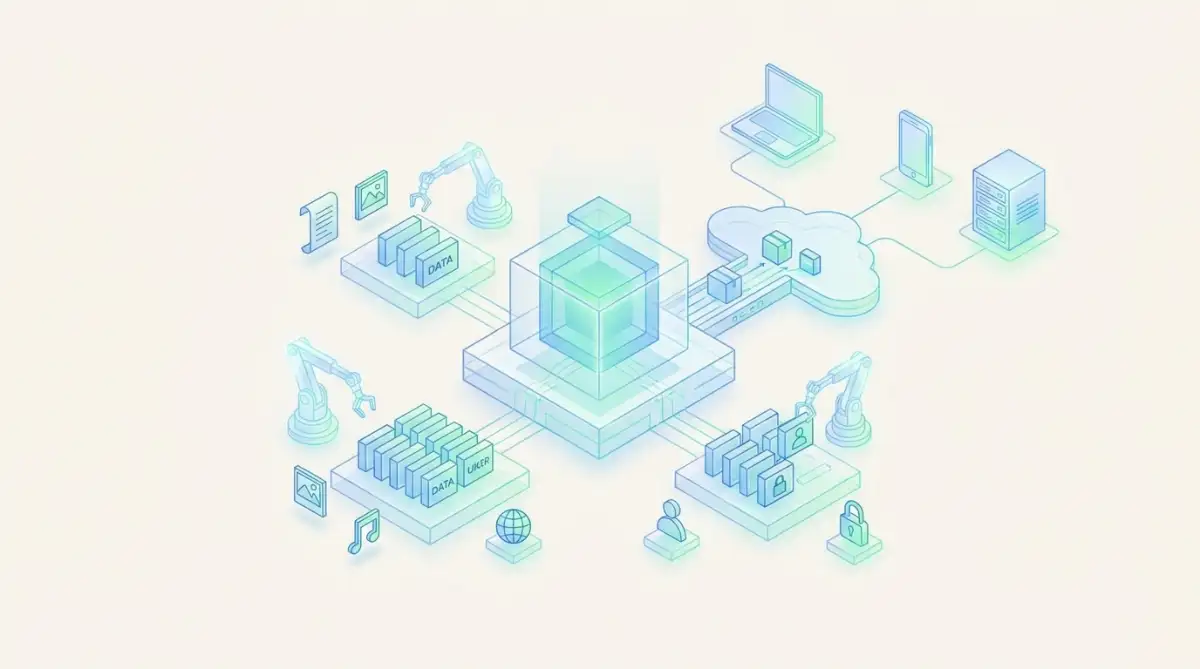
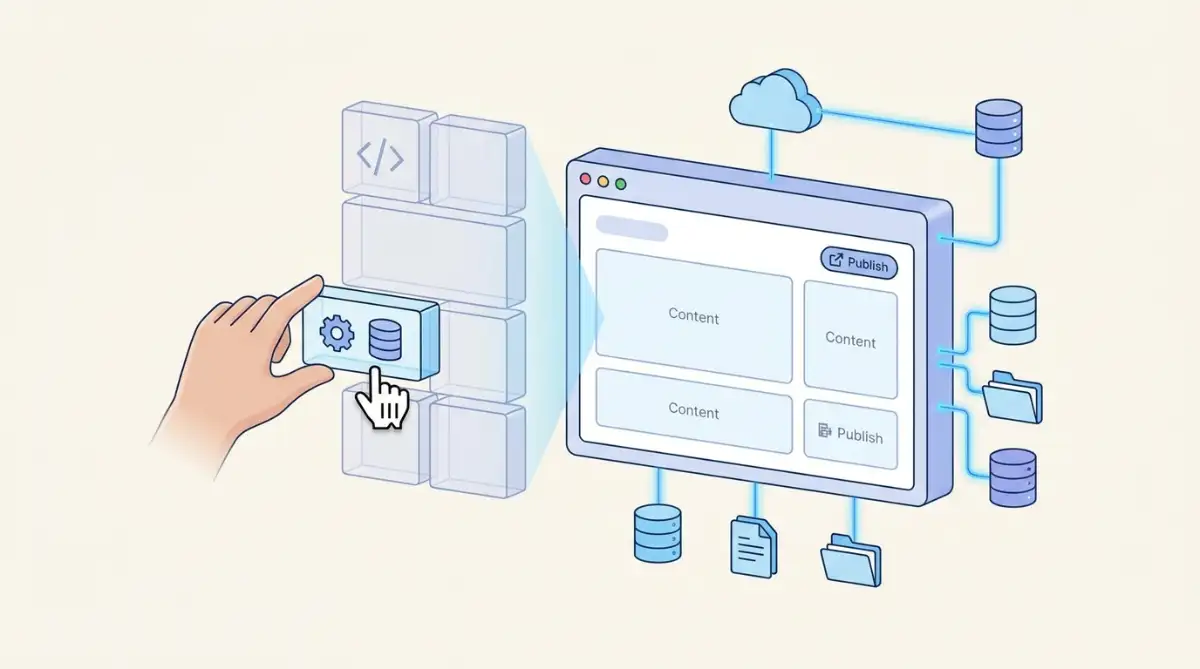
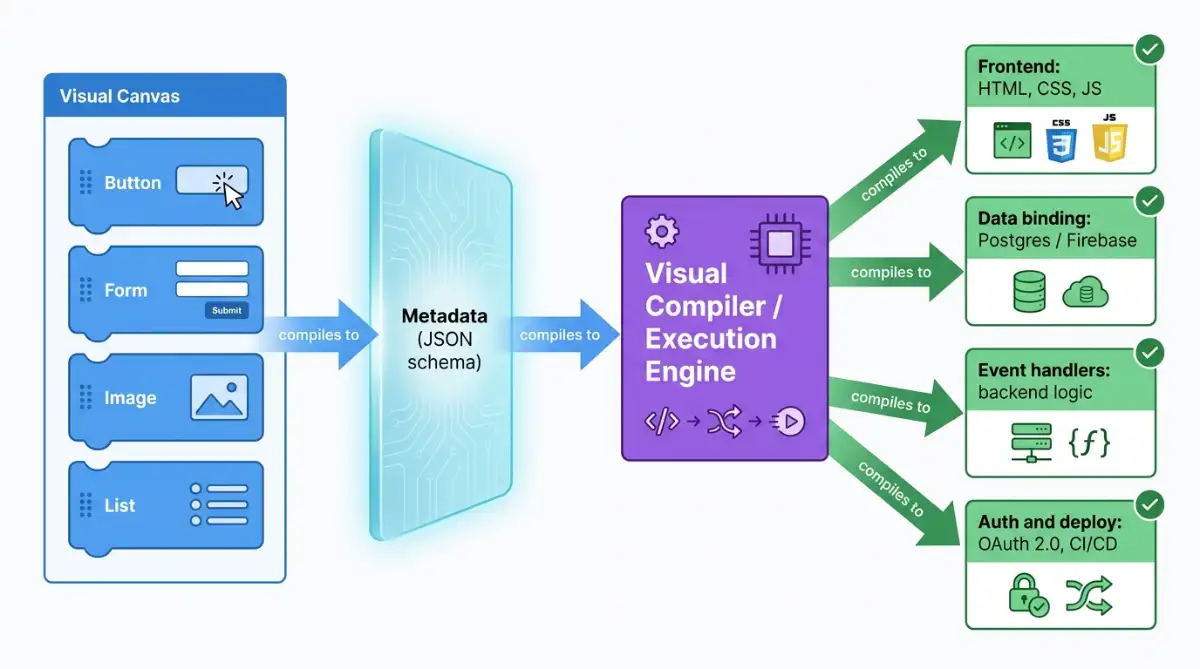
No-code is software you build by arranging visual components instead of typing syntax. Strip away the canvas, though, and every platform works as a visual compiler: it translates your on-screen choices into structured metadata, then an execution engine turns that metadata into real frontend markup, database connections, and backend logic. You design; the platform writes the code.
That distinction matters more than the marketing suggests. When you drop a button onto a page in a tool like Webflow or Bubble, the platform is compiling optimized HTML, CSS, and JavaScript behind the glass. As IBM notes in its primer on no-code, the term is a bit of a misnomer: the components are built from code, you just are not the one writing it. The pre-built blocks you drag around are modular abstractions of complex codebases, which is why a citizen developer can focus on business logic while the engine handles the plumbing.
This is where a common mix-up begins. People increasingly lump no-code together with vibe coding, but the two are not the same: no-code keeps you inside a visual builder, while vibe coding hands your plain-language prompts to an AI that writes the actual code.
The drag-and-drop canvas is the easy part. The execution engine quietly compiling markup, binding data, and routing deployments is the actual product.
Here is what the engine handles for you on every build:
- Frontend rendering: compiles layouts into browser-ready markup and styling.
- Data binding: connects visual fields to underlying databases.
- Event handling: triggers backend logic when users click, type, or submit.
- Authentication and deployment: manages logins and pushes builds to production.
If you want the deeper mechanics, this breakdown of what a no-code builder actually is goes a layer further.
How Did No-Code Evolve From Excel to AI?
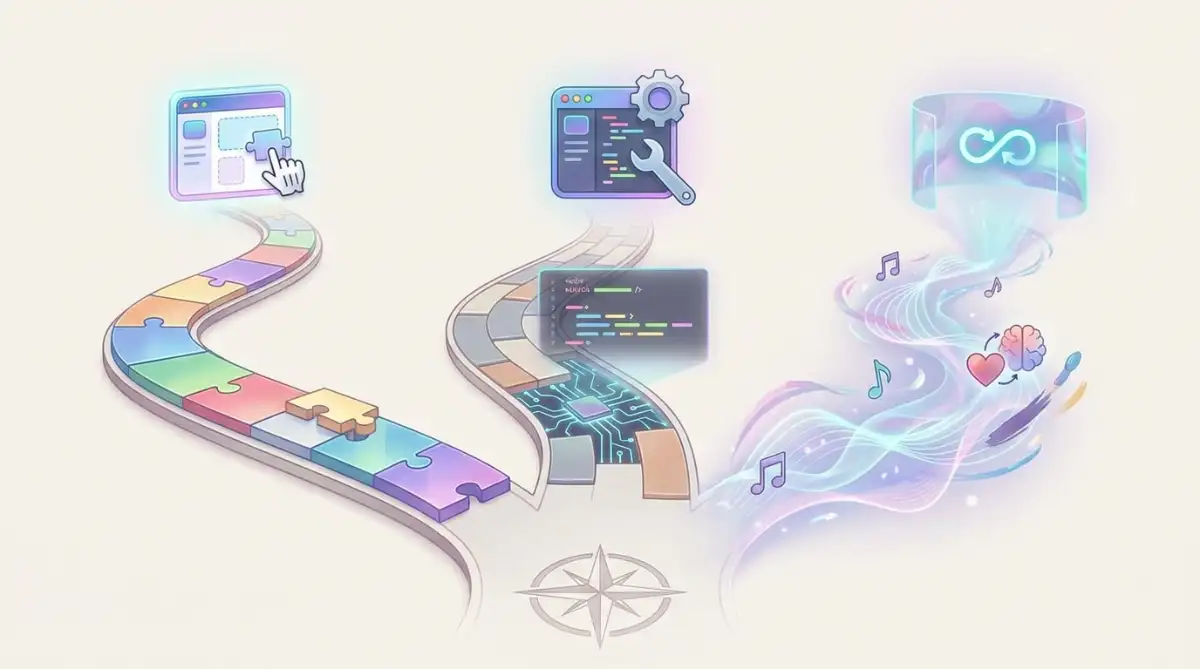
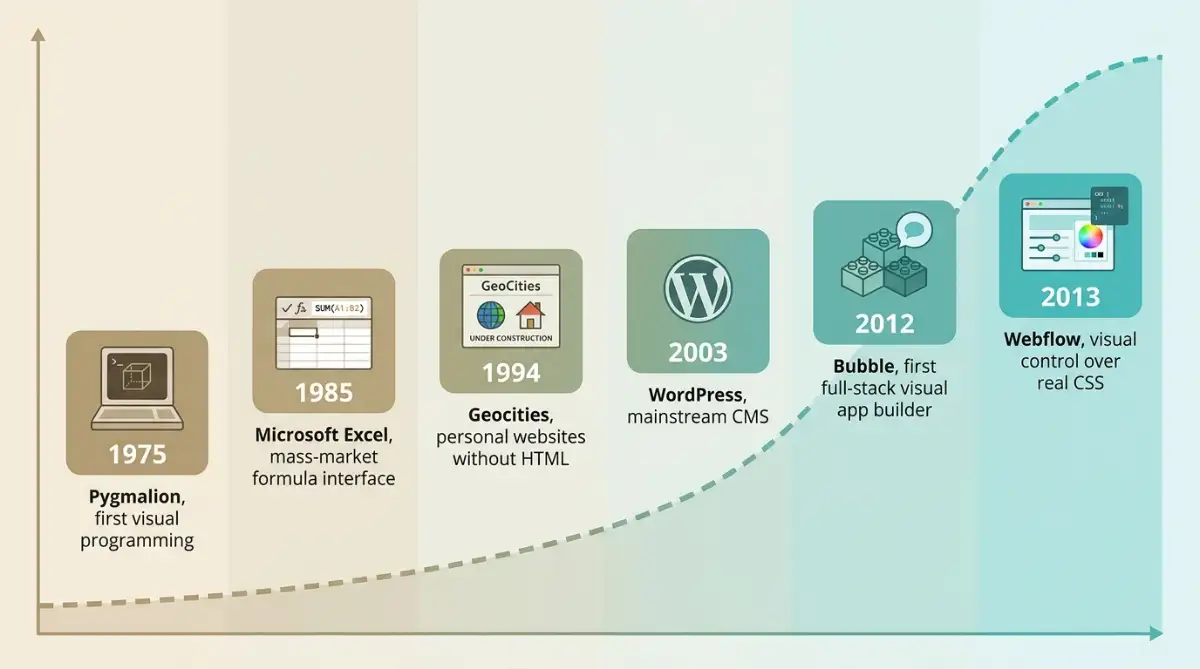
No code did not appear overnight. It is the result of a multi-decade march in software abstraction that started long before drag-and-drop was a marketing term. The earliest conceptual ancestor was the 1975 Pygmalion project, which tried to represent programs as visual "movies" of screen transformations rather than abstract statements.
The lineage runs straight through tools most people never think of as programming. Microsoft Excel arrived in 1985 as the first mass-market visual, formula-based interface, handing data manipulation to non-programmers for the first time. Consumer website builders followed with Geocities in 1994, then WordPress reshaped publishing in 2003, and Formstack brought no-code forms in 2006.
Excel was the original no-code tool. Tens of millions of people have built logic with formulas for forty years without ever calling themselves developers.
The modern full-stack era began in the early 2010s with Bubble (2012) and Webflow (2013), the first platforms to compile entire applications visually.
| Year | Milestone | Why it mattered |
|---|---|---|
| 1975 | Pygmalion project | First attempt at visual programming via icons |
| 1985 | Microsoft Excel | Mass-market formula interface for non-coders |
| 1994 | Geocities | Personal websites without HTML knowledge |
| 2003 | WordPress | Made publishing and CMS work mainstream |
| 2012 | Bubble | First true full-stack visual app builder |
| 2013 | Webflow | Designer-grade sites mapped to real CSS |
The Geocities and early personal-web era is worth reading if you want the messy origin story, and WordPress's 2003 arrival is arguably the moment no code went mainstream.
What's the Difference Between No-Code and Low-Code?
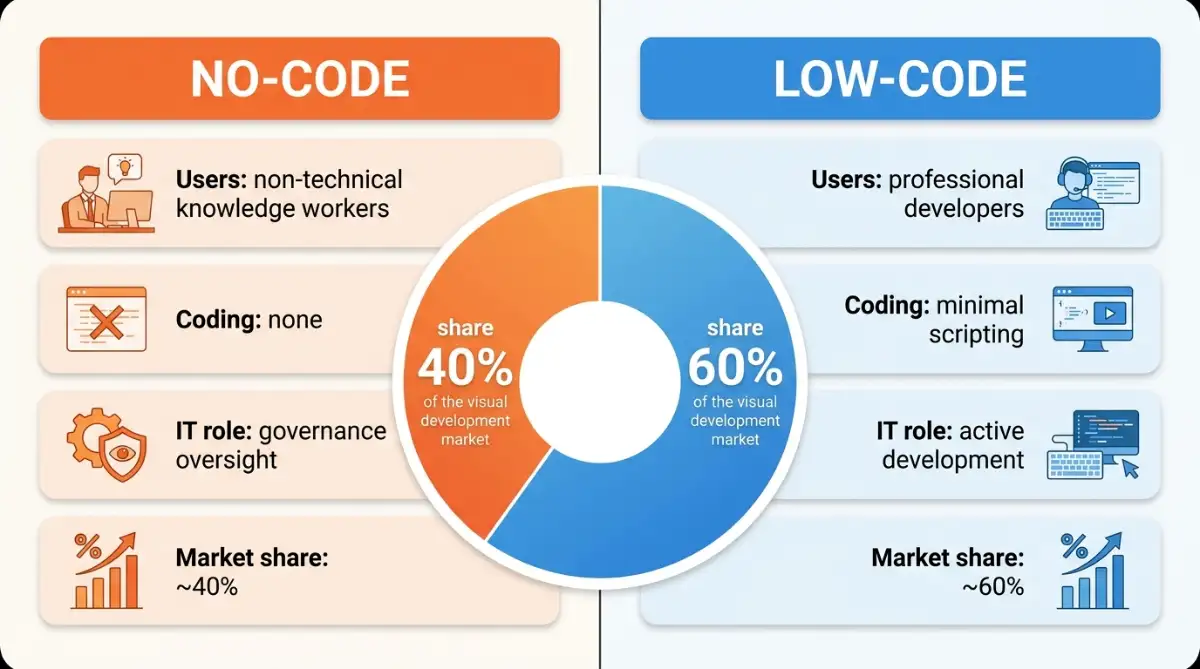
No-code requires zero programming and targets business users, while low-code targets professional developers who want to ship faster and will write some script for the hard parts. Both sit under the visual development umbrella, but they solve different problems for different people, and confusing them leads to picking the wrong tool.
The split is mostly about who is meant to be holding the mouse. No-code platforms hand everything to citizen developers through drag-and-drop, with IT involvement limited to governance oversight. Low-code platforms assume a developer is present and offer scripting hooks for complex requirements. Gartner analyst Jason Wong has pointed to high talent costs and borderless, hybrid workforces as accelerants for both.
| Factor | No-Code | Low-Code |
|---|---|---|
| Primary user | Non-technical knowledge workers | Professional developers |
| Coding required | None | Minimal scripting |
| 2026 market share | ~40% | ~60% |
| IT role | Governance oversight | Active development |
| Best for | Fast MVPs, internal tools, sites | Complex, integration-heavy systems |
No-code asks the software to speak your language. Low-code still asks you to speak a little of the software's.
If you sit on the developer side of that table, the low-code middle ground explains where the line actually falls in practice.
Why Is No-Code Growing So Fast?
No code is growing because the supply of developers cannot meet the demand for software, full stop. The projected global developer shortfall is heading toward four million unfilled roles, which turns citizen development from a nice efficiency play into a survival strategy. Estimates of the 2026 no-code and low-code market vary by methodology, landing roughly between $30 billion and $50 billion, but analysts broadly agree it is growing north of 20% a year.
The adoption numbers are not subtle. Gartner estimates that by 2026, around 80% of technology products and services will be built by people outside formal IT departments, and there are now an estimated 100 to 120 million active citizen developers. Inside large enterprises that formally adopted these platforms, citizen developers outnumber professional developers roughly 4 to 1.
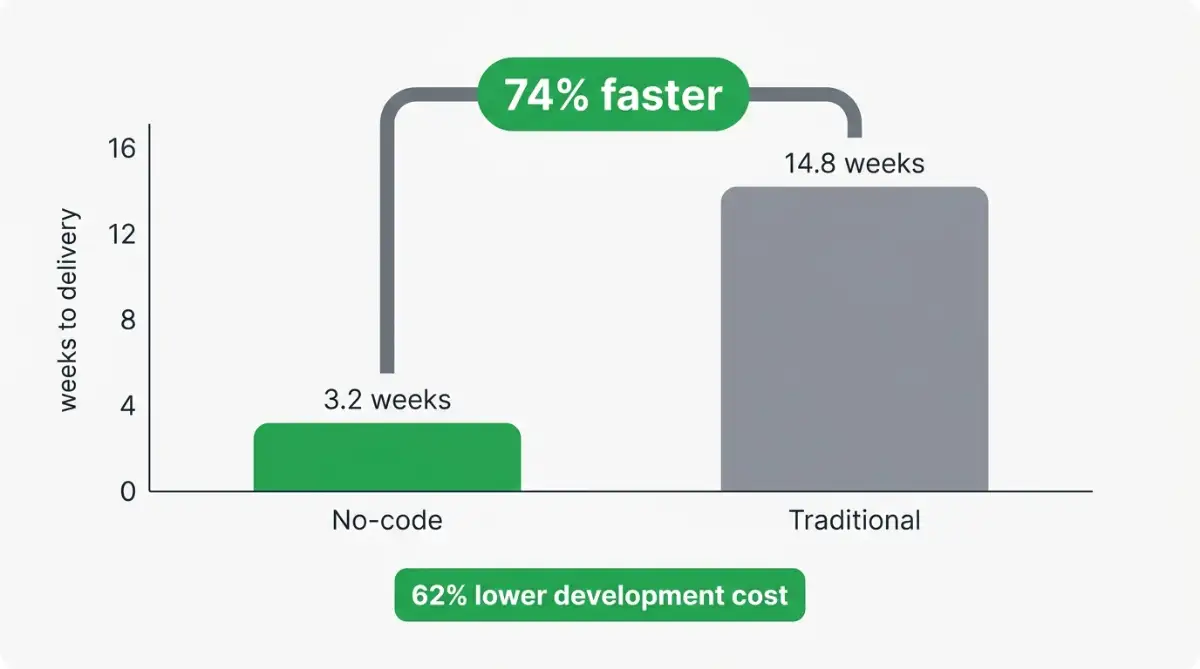
Speed and cost seal the case. According to the research, visual projects finish in an average of 3.2 weeks versus 14.8 weeks for traditional development, a 74% faster time to market alongside a 62% average cost reduction.
- Enterprise spend: grew 31% year-on-year in 2025, against an 8% rise in overall IT budgets.
- New apps: 70% of new enterprise applications projected to use no-code or low-code in 2026, up from under 25% in 2020.
- Marketing leads adoption: 68% of marketing managers use no-code tools daily.
By 2026, roughly four in five technology products will be built by people who do not work in IT. That is not a trend; that is a takeover.
Webflow CEO Vlad Magdalin has argued that abstracting HTML, CSS, and JavaScript raises global technical literacy and lets founders validate ideas without expensive engineering bottlenecks. Bubble co-founder Emmanuel Straschnov goes further, calling the demand that humans speak the language of computers a historical anomaly. Microsoft CEO Satya Nadella has echoed the same direction, telling ITPro that AI now means almost anyone can be a software developer, even as he stressed that real skill still matters.
What Can You Actually Build Without Writing Code?
You can build almost any standard digital product without code: marketing sites, full web and mobile apps, internal databases, and automated workflows that connect your other tools. The catch is matching the build type to the right architecture, because a landing page and a transactional app have very different needs under the hood.
Application builders fall into three architectures worth knowing. Monolithic full-stack engines like Bubble compile the frontend, logic, and database into one hosted environment. Native-first platforms like FlutterFlow compile visual logic into real Flutter and Dart code that ships to the iOS and Android app stores. Modular decoupled stacks separate the frontend (WeWeb) from the backend (Xano or Supabase) over secure REST APIs.
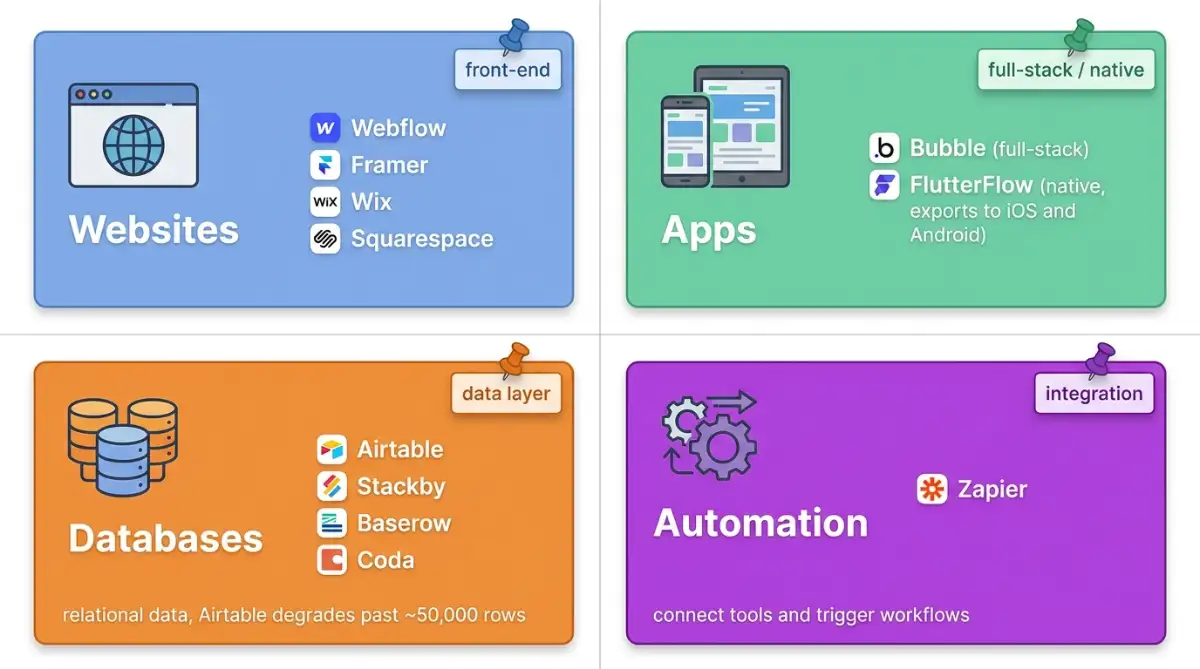
- Websites: designer-grade sites in Webflow or Framer, and template-driven builds in Wix and Squarespace.
- Apps: full-stack tools in Bubble or native apps in FlutterFlow.
- Databases: relational data in Airtable, Stackby, Coda, or open-source Baserow.
- Automation: workflows that connect everything, the kind Zapier pioneered.
Does no code scale to a real business? Honestly, it depends on the build, but the ceiling is higher than skeptics assume. In a Starter Story feature, a solo founder describes growing a no-code app into a seven-figure business, a useful reality check on what one person can ship.
Watch: How one person built a $1M app with no code (Starter Story)
The question is no longer whether a non-coder can build a real product. It is whether they picked an architecture that survives their tenth thousand users.
What's the Easiest Way to Build a No-Code Website?
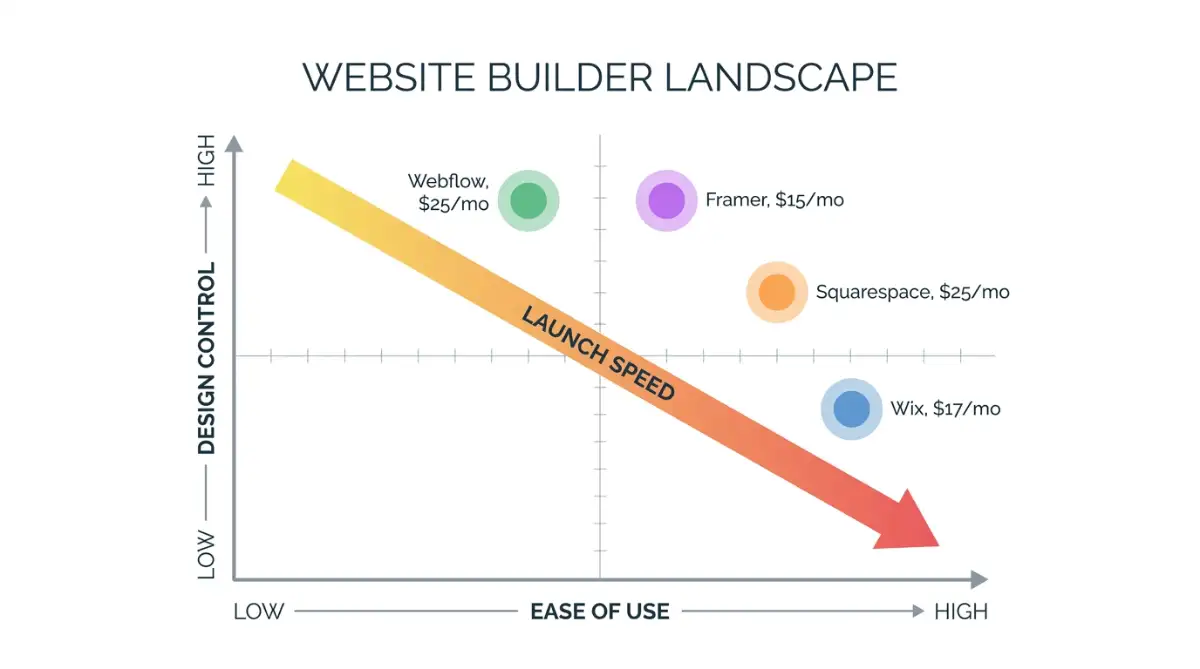
For most non-technical people, the easiest route is a template-driven builder like Wix or Squarespace, where you pick a finished design and edit it in place. Designers who want real control without touching code reach for Webflow or Framer, which trade some hand-holding for far wider creative range.
The choice comes down to control versus speed. Wix and Squarespace hand a restaurant owner or coach a guided editor and a polished template, so a booking-ready site can go live in an afternoon. Webflow and Framer expose more of the page's underlying structure, which means a steeper climb but a result that does not look stamped from the same mold as ten thousand other sites.
The right website builder is rarely the most powerful one. It is the one you will actually finish before your launch deadline passes.
| Builder | Approach | Learning curve | Best for |
|---|---|---|---|
| Wix | Guided editor over templates | Low | Small businesses launching fast |
| Squarespace | Polished, curated templates | Low | Portfolios, restaurants, creatives |
| Webflow | Visual control over real CSS | Medium to high | Designers and content-rich sites |
| Framer | Design-first with AI assists | Medium | Modern marketing and personal sites |
If you are stuck between the two designer-grade options, this Framer versus Webflow breakdown settles most of the debate, while the Wix versus Framer comparison covers the simpler end of the market. One word of caution before you commit: if you plan to start from a free theme, check whether a free template might hurt your SEO first.
How Much Does No-Code Really Cost?
The honest answer is that entry pricing looks cheap and scaled pricing is not. Plans start as low as $15 a month for a simple site, but real costs climb with usage, database storage, active users, and API calls. The tools that look cheapest at signup are sometimes the priciest once traffic arrives.
Those website builders are the affordable, predictable end of no-code: flat monthly subscriptions with no usage meter, so the price at checkout is close to what you actually pay.
| Website builder | Lowest paid plan | Monthly price | Best for |
|---|---|---|---|
| Framer | Basic | $15 (billed annually) | Creative personal sites |
| Wix | Light | $17 | Small business basics |
| Webflow | Basic | $25 | Designer-grade static sites |
| Squarespace | Basic | $25 | Portfolios, restaurants, creatives |
App builders are where the meter starts running. The defining cautionary tale is Bubble's 2023 pricing shift from fixed server capacity to consumption-based Workload Units (WUs). Under the new model, a simple page load burns 0.5 to 2 WUs, a complex search across thousands of records eats 10 to 50 WUs, and bulk operations can run 20 to 100 WUs each. Inefficiently built apps saw overnight cost increases of 300% to 500%, which forced agencies to renegotiate with clients.
| App builder | Lowest paid plan | Code export | Lock-in risk |
|---|---|---|---|
| Glide | $25/mo (Explorer) | No | High |
| FlutterFlow | $39/mo (Basic) | Yes (Flutter/Dart) | Low |
| Adalo | $45/mo (Starter) | No | High |
| Bubble | $69/mo (Starter) | No | High |
Two of those numbers hide a catch. Glide adds usage fees of roughly 2 cents per update on top of its base price, and Bubble's Workload Units mean the monthly bill moves with your traffic, while Adalo and FlutterFlow charge flat rates with no per-action metering.
A platform that will not let you export your code does not just host your app. It holds your business continuity hostage.
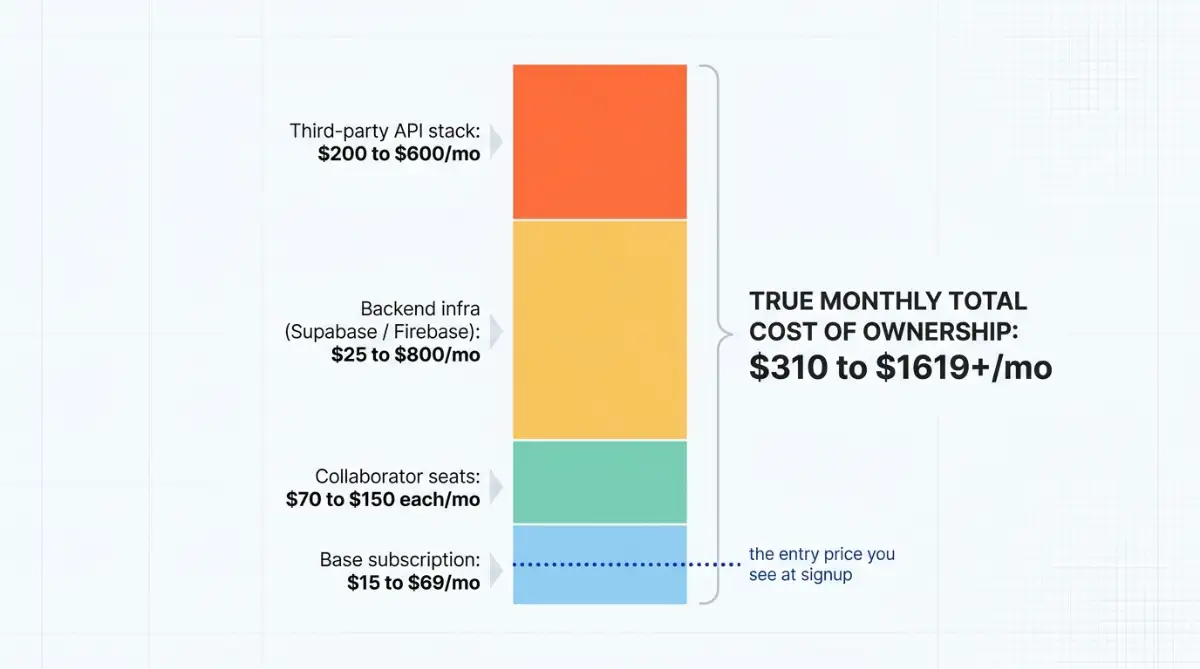
Beyond the subscription, total cost of ownership stacks up fast: collaborative seats run $70 to $150 each per month, decoupled backends like Supabase or Firebase scale from $25 to over $800 monthly, and a third-party API stack adds $200 to $600. The full cost comparison across 20 tools is worth a look before you commit a roadmap to one vendor.
Start exploring launch-ready no-code templates here!
Is No-Code Actually Secure?
No-code platforms remove whole classes of traditional bugs, but they do not make an app secure on their own. Because citizen developers often lack formal security training, they fall into what the OWASP Citizen Development Top 10 calls CD-SEC-01: Blind Trust, assuming platform defaults and marketplace templates are safe when they may not be.
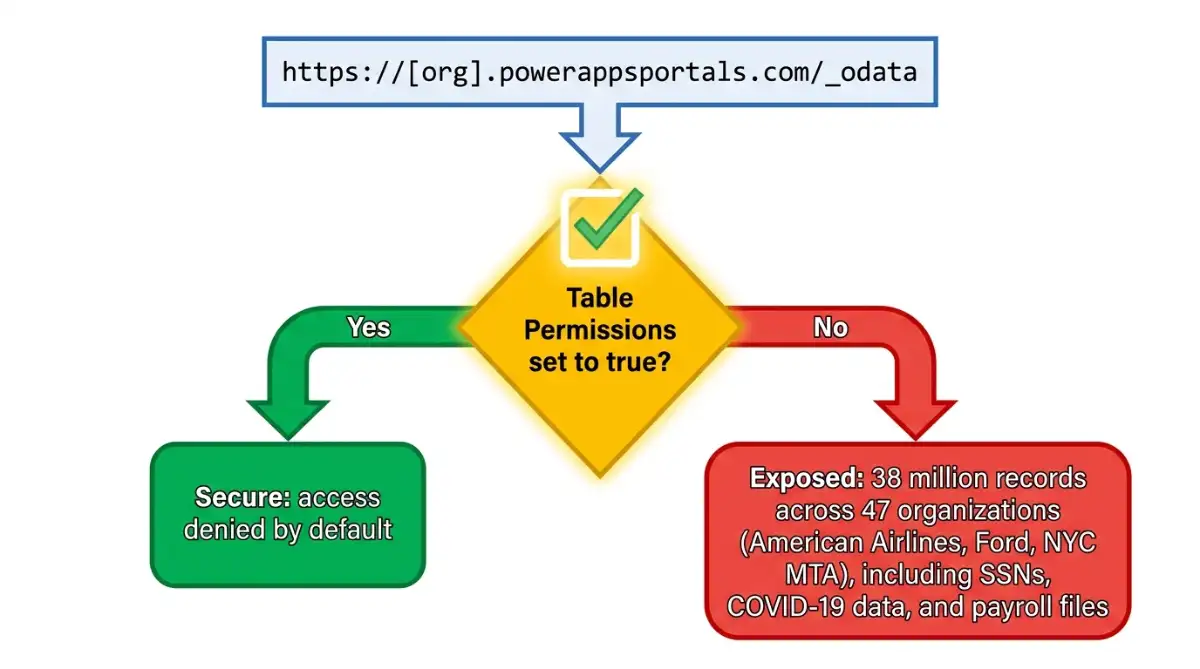
The clearest lesson is the August 2021 Microsoft Power Apps portal leak, discovered and reported by security vendor UpGuard. Around 38 million sensitive records, including Social Security numbers, COVID-19 contact tracing data, and payroll files, were exposed across 47 entities including American Airlines, Ford Motor Company, and the New York City MTA. No exploit was needed. A default setting left list-organized data public unless an admin manually enabled Table Permissions.
Thirty-eight million records were exposed not by a hacker, but by a checkbox nobody knew they had to tick.
Microsoft later flipped that permission to secure by default and released a self-diagnosis tool. The takeaway for any team is governance, not fear:
- Treat templates as untrusted until reviewed, not as automatically safe.
- Deny database access by default, then grant it deliberately.
- Gate high-risk apps (anything touching payments or personal data) through formal review.
- Stand up a Center of Excellence to give builders vetted components and checklists.
In my experience, the platform is rarely the weak link. The default configuration nobody questioned almost always is.
FAQ
Is no-code the same as vibe code? Not quite. No-code means building through visual drag-and-drop interfaces with prebuilt components, while vibe coding means describing what you want in plain language and letting AI generate the actual code. Both skip manual programming, but vibe coding produces real source code, whereas no-code keeps you inside a visual platform.
Can you build a real business on no-code? Yes, many people do. Platforms like Bubble and FlutterFlow power real revenue-generating apps, and some solo founders have grown no-code products into seven-figure businesses. Success depends more on choosing the right architecture early than on the tool's reputation.
Is no-code cheaper than hiring a developer? Usually at the start, yes. Research cites a 62% average cost reduction and 74% faster delivery versus traditional development. At scale, though, usage-based fees, seats, and backend costs can climb, so the savings depend heavily on how efficiently the app is built.
Do you own the code a no-code platform generates? It depends on the platform. FlutterFlow and WeWeb let you export source code, which lowers lock-in risk. Bubble, Adalo, and Glide do not offer code export, meaning leaving the platform often requires rebuilding the app from scratch.
Will no-code replace programmers? Not likely. With a projected four-million-developer shortfall, no code mostly absorbs work that was never getting built anyway. Complex, high-scale, and security-critical systems still need professional engineers, while citizen developers handle the long tail of everyday software.
Start building without code
Browse thousands of no-code templates for Webflow, Framer, Bubble, Lovable, Replit and more.
Explore Templates